| |
Specifications
|
Hardware Interface
|
SoC & Wireless Module
|
POWER ADAPTER
|
|
2x3dBi Dipole Antenna
Reset/WPS button
LED indicators: Power, WLAN, WAN
|
SoC: Ralink RT2880
Ralink RT2880 + RT2820
|
12VDC, 1A
|
|
OUTPUT POWER
|
INSTALLATION
|
MEMORY
|
|
11n:15dBm ± 1dBm, 11g:15dBm ± 1dBm, 11b:17 ± 1dBm
|
Quick installation Guide
|
4 MB Flash
16 MB SDRAM
|
|
SECURITY
|
LAN PORT
|
HUMIDITY & TEMPERATURE
|
|
64/128-bit WEP, WPA and WPA2
MAC Filter
|
10/100M UTP Port x 1
|
Max. 10~90% (Non Condensing)
10 ~40°C
|
|
SYSTEM REQUIREMENTS
|
DIMENSION
|
CERTIFICATIONS
|
|
Windows 95/98/ME/2000/XP/Vista
|
30(H) x 127(W) x 96(D) mm
|
CE, FCC
|
|
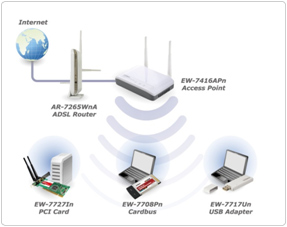
| An
example of how the EW-7416APn can be setup:
• Connect the access point
to ADSL modem, router, or switch/hub in your
network through the LAN port of the access point
by Ethernet cable.
• Connect a computer to the LAN port and
follow the quick installation guide to configure
the advanced setting of Access point .
• Connect wireless devices to EW-7416APn
|
|
|
|
|

 Manual

